
Node.js AI API 故障自动切换教程:多模型 Fallback、超时控制与熔断机制
使用 Node.js 原生 fetch 开发 AI API 多模型故障切换工具,根据限流、服务异常和超时等错误选择备用模型,通过熔断减少重复失败请求,包含完整代码、模型配置、离线模拟测试和费用风险分析,适合 AI 应用、SaaS 平台及 API 网关开发者。
1. 项目背景与架构
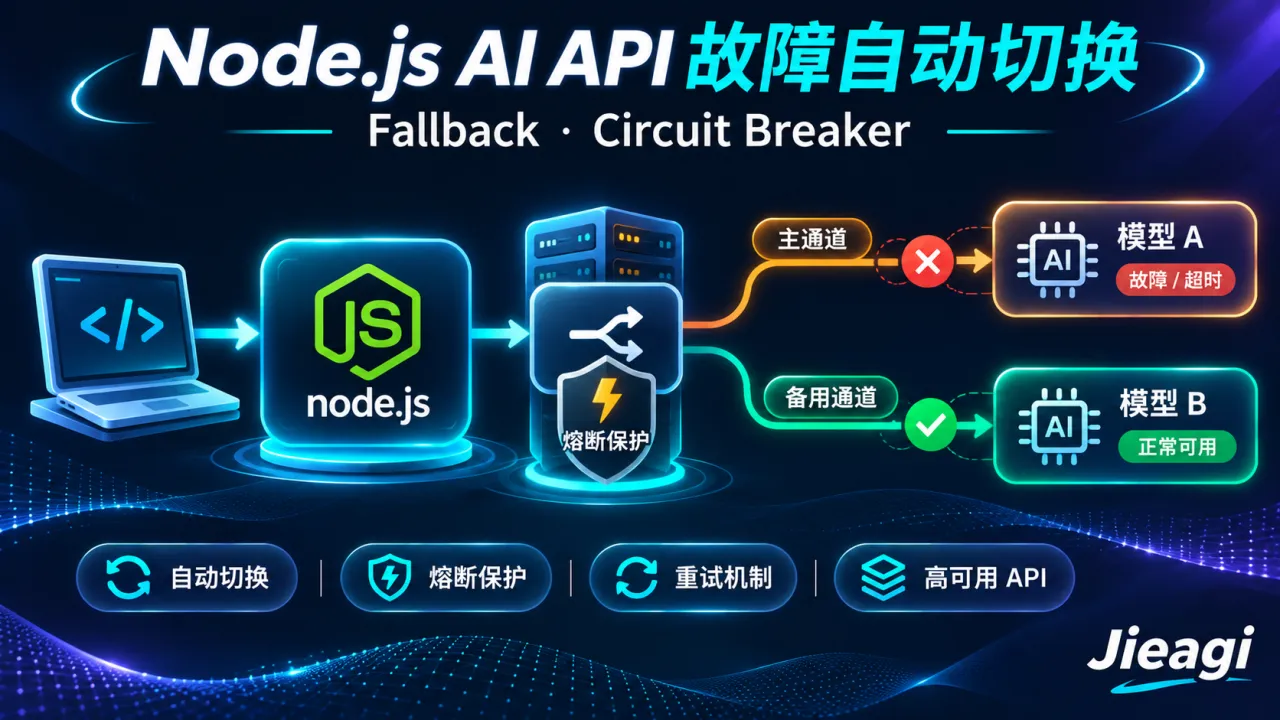
单模型故障可能导致整个 AI 功能不可用。Fallback 在符合条件的错误发生时尝试备用模型,但认证错误不应盲目重试,超时也可能已经产生费用。本例是同一聚合网关内的模型切换,不是跨供应商灾备。
flowchart TD
 A[业务请求] --> B[主模型]
 B --> C{结果}
 C -->|成功| D[返回]
 C -->|可切换错误| E[备用模型]
 C -->|认证或参数错误| F[停止]
 E --> D
2. 环境准备
Node.js 22+,无需 npm 依赖。在 uiuiAPI 获取 API Key,选择两个支持普通文本 Chat Completions 的模型。第三方聚合服务的权限、价格和模型行为可能不同于官方服务。
ai-api-fallback/
├── fallback.mjs
└── test.mjs
PowerShell:
$env:UIUI_API_KEY="替换为你的密钥"
$env:PRIMARY_MODEL="替换为主模型"
$env:BACKUP_MODEL="替换为备用模型"
$env:ALLOW_TIMEOUT_FALLBACK="0"
macOS/Linux:
export UIUI_API_KEY="替换为你的密钥"
export PRIMARY_MODEL="替换为主模型"
export BACKUP_MODEL="替换为备用模型"
export ALLOW_TIMEOUT_FALLBACK="0"
3. 完整代码:fallback.mjs
import { pathToFileURL } from 'node:url';
const URL = 'https://api.uiuihao.com/v1/chat/completions';
class ApiError extends Error {
  constructor(code, canFallback = false) {
    super(code); this.code = code; this.canFallback = canFallback;
  }
}
export function createClient({apiKey, models, timeoutMs=30000,
  failureThreshold=2, cooldownMs=60000, allowTimeoutFallback=false,
  fetchImpl=globalThis.fetch}) {
  if (!apiKey || !Array.isArray(models) || models.length !== 2 ||
      models.some(m => typeof m !== 'string' || !m.trim()) || new Set(models).size !== 2)
    throw new Error('请配置密钥及两个不同模型');
  const states = new Map(models.map(m => [m,{failures:0,openUntil:0,inFlight:false}]));
  async function request(model,messages) {
    let data;
    try {
      const r = await fetchImpl(URL,{method:'POST',redirect:'error',
        headers:{Authorization:`Bearer ${apiKey}`,'Content-Type':'application/json'},
        body:JSON.stringify({model,messages}),signal:AbortSignal.timeout(timeoutMs)});
      if (!r.ok) throw new ApiError(`HTTP_${r.status}`,[429,502,503,504].includes(r.status));
      try { data = await r.json(); }
      catch(e) { if (['TimeoutError','AbortError'].includes(e.name)) throw e; throw new ApiError('INVALID_JSON'); }
    } catch(e) {
      if (e instanceof ApiError) throw e;
      if (['TimeoutError','AbortError'].includes(e.name)) throw new ApiError('TIMEOUT',allowTimeoutFallback);
      throw new ApiError('NETWORK_ERROR');
    }
    const content=data.choices?.[0]?.message?.content;
    if(typeof content!=='string'||!content.trim()) throw new ApiError('EMPTY_RESPONSE');
    return {content,usage:data.usage??null,reportedModel:data.model??null};
  }
  async function complete(messages) {
    if(!Array.isArray(messages)||!messages.length) throw new Error('messages不能为空');
    const attempts=[];
    for(const model of models) {
      const s=states.get(model);
      if(Date.now()<s.openUntil||s.inFlight) {
        attempts.push({model,status:s.inFlight?'busy':'circuit_open'}); continue;
      }
      s.inFlight=true;
      const start=performance.now();
      try {
        const result=await request(model,messages);
        s.failures=0;s.openUntil=0;
        attempts.push({model,status:'success',latencyMs:Math.round(performance.now()-start)});
        return {...result,selectedModel:model,attempts};
      } catch(e) {
        attempts.push({model,status:e.code??'UNKNOWN_ERROR'});
        if(e.canFallback||['TIMEOUT','NETWORK_ERROR'].includes(e.code)) {
          if(++s.failures>=failureThreshold) s.openUntil=Date.now()+cooldownMs;
        }
        if(!e.canFallback){e.attempts=attempts;throw e;}
      } finally {s.inFlight=false;}
    }
    const e=new ApiError('ALL_MODELS_UNAVAILABLE');e.attempts=attempts;throw e;
  }
  return {complete,getStates:()=>Object.fromEntries([...states].map(([m,s])=>[m,{...s}]))};
}
async function main(){
  const client=createClient({apiKey:process.env.UIUI_API_KEY,
    models:[process.env.PRIMARY_MODEL,process.env.BACKUP_MODEL],
    allowTimeoutFallback:process.env.ALLOW_TIMEOUT_FALLBACK==='1'});
  const prompt=process.argv.slice(2).join(' ').trim();
  if(!prompt||prompt.length>4000) throw new Error('请输入1至4000字符');
  console.log(await client.complete([{role:'user',content:prompt}]));
}
if(process.argv[1]&&import.meta.url===pathToFileURL(process.argv[1]).href)
  main().catch(e=>{console.error(e.message,e.attempts??'');process.exitCode=1;});
4. 离线测试:test.mjs
import test from 'node:test';
import assert from 'node:assert/strict';
import {createClient} from './fallback.mjs';
const messages=[{role:'user',content:'测试'}];
const ok=()=>new Response(JSON.stringify({choices:[{message:{content:'模拟成功'}}]}));
const client=fetchImpl=>createClient({apiKey:'offline-test-placeholder',models:['primary','backup'],fetchImpl});
test('503切换备用模型',async()=>{
 let n=0;const c=client(async()=>++n===1?new Response('',{status:503}):ok());
 assert.equal((await c.complete(messages)).selectedModel,'backup');assert.equal(n,2);
});
test('401停止',async()=>{
 let n=0;const c=client(async()=>{n++;return new Response('',{status:401});});
 await assert.rejects(c.complete(messages),/HTTP_401/);assert.equal(n,1);
});
test('连续失败触发熔断',async()=>{
 let n=0;const c=client(async(u,o)=>{if(JSON.parse(o.body).model==='primary'){n++;return new Response('',{status:503});}return ok();});
 await c.complete(messages);await c.complete(messages);
 assert.equal((await c.complete(messages)).attempts[0].status,'circuit_open');assert.equal(n,2);
});
test('默认超时不切换',async()=>{
 let n=0;const c=client(async()=>{n++;throw new DOMException('模拟超时','TimeoutError');});
 await assert.rejects(c.complete(messages),/TIMEOUT/);assert.equal(n,1);
});
node --test test.mjs
node fallback.mjs "用100字解释Redis缓存的作用"预期示意(不是实际回包):主模型 HTTP_503,备用模型 success,selectedModel 为备用模型。离线测试不调用真实 API。
5. 熔断原理
连续两次符合条件的故障触发60秒冷却。冷却期间跳过故障模型,期满后允许恢复探测,成功清空状态。状态只保存在当前进程内存中,因此生产环境需要共享长生命周期客户端。当前实现还限制每个模型同时只有一个在途请求,适合低并发示例而非高吞吐网关。
6. 常见错误
| 错误 | 策略 |
|---|---|
| 401/403 | 停止并核实密钥或权限 |
| 400 | 检查参数和模型兼容性 |
| 429 | 尝试备用模型,但账户级限流可能同时影响两者 |
| 502/503/504 | 允许切换 |
| 超时/网络异常 | 默认停止,计费可能不确定 |
| 非法JSON | 停止排查渠道 |
7. 成本与安全
保守估计,若每天10000次业务请求有5%触发备用调用,则增加500次调用;假设备用单次0.03元,额外15元。不是平台实际报价。备用模型需使用相同业务测试集验收,避免输出格式和能力退化。不得将密钥写入日志或前端。即使503等错误也可能存在上游已执行的情况。
8. 扩展与总结
可增加 Redis 分布式熔断、预算上限和健康检查。流式响应已经发送部分文字后不能直接切换模型,否则可能出现重复或矛盾。本文仅适用于非流式请求,通过有限故障切换降低失败放大风险。
参考资料
- https://developers.openai.com/api/reference/resources/chat
- https://nodejs.org/api/globals.html
- https://nodejs.org/api/test.html
- https://learn.microsoft.com/en-us/azure/architecture/patterns/circuit-breaker
原稿参考日期:2026-11-25;未进行真实付费 API 联调。

关注 AI 前沿动态,分享模型、工具与实战教程。


暂无评论